| How-to-use BRidgeBRowser
DAY SIX |
| Question 6:
With no singletons or five-card suits, if you have a 4-4 major suit fit, should you prefer 3NT or 4 of a Major? We will start with 4H+4H. 4S+4S is left as an exercise for the reader. Just to recap here are the previous tutorials:
|
| 1. Fire up BRBR Online. The latest version is 2.3A-h-4 |
| 2. Select S(can R(eset All (only need to do this once, just make sure you haven't restricted all your searches on some previous visit) |
| 3. Click on the tab about halfway down, BELOW "BRidgeBRowser (tm)" which says "Brd Shape/HCP". Click "Clear terms". |
| 4. In the Brd Shape/HCP tab, click on the following terms, in order:
a. Hearts - Dealer b. Hearts - 3rd Pos c. Shape - Dealer d. Shape - 3rd Pos e. HCP Team - Dealer The result should look like this:
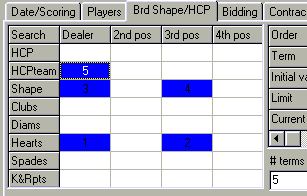
It may seem hard to understand how to make these selections. It is equally hard for me to explain. However I would counsel that the best thing you can do is to try the effect of different settings, particularly watching what happens to the way you traverse the database. To do this, it is necessary to experiment by looking at the hands returned (in the main window) to understand the search order(s). The aim is always to search the smallest number of records - achieving this may seem something of a black art, until you understand that there are four main indexes to the data. NOTE WELL: which primary search depends on which search button you press. There are FIVE of them, one on each of the main search tabs. Any SECONDARY terms will be highlighted, and only assist in accepting or rejecting the records returned - their index is not used. A. The sequential (or time) index, covering the whole database chronologically. This is used for Time searches, Contract Searches, and Bidding searches where the "Specify Exact seats" box is checked. B. The Player index - enables you to retrieve quickly all the hands played by one individual. C. The Bidding index. This is static, and there is one for each .PLY (or .TPL) file. Searching the bidding index, as we have seen, has a major caveat - you MUST finish the search, or the results are likely to be invalid. This index is NOT used when the "Specify Exact Seats" box is checked, as the index is opening-bid related. However, the good news is that Bidding searches cover all seats. D. The Board index is dynamic (generated on each search). It allows you to return, by user-selected sort key, records that match a particular hand pattern. This is the hardest to use, but by far the most powerful. Any of the 5 PRIMARY searches will show (during search) the type of search being done, at the top of the main screen of BRidgeBRowser.
|
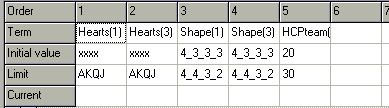
| 6. Set the limits for the Board shape/HCP tab as follows:
Hearts(1) xxxx thru AKQJ (ie any 4 hearts)
Shape(1) 4333 thru 4432
HCPTeam (1) 20 thru 30 When you are done it should look as follows:
|
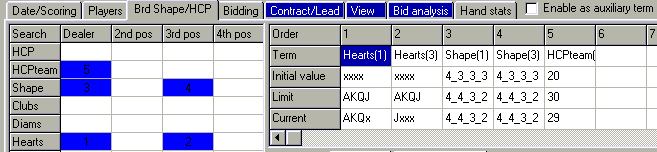
| 7. Click on Contract/Lead, and click on the radio button marked "Specified".
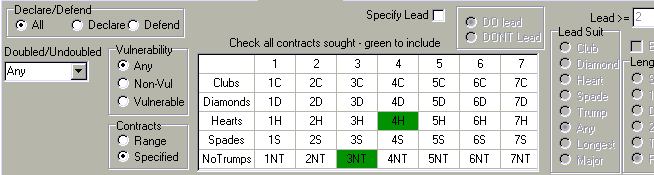
Clear all contracts by clicking on the TOP LEFT square in the grid. Now
set (only) 4H and 4S by clicking those two squares once. The result should
be:
Check the "enable as auxiliary term" box for the contract tab.
|
| 8. Click on the tab marked Bid Analysis, check the "Enable as auxiliary term" box. |
| 9. Click on the View tab, check the "enable as auxiliary term" and select "Declarer" for the "View From" seat. |
| 10. Go back to Brd Shape/HCP tab, and press "Search". Here is a shot
at the END of the search.
You can watch the key sequence being cycled on this screen. First all the hands where dealer has xxxx Hearts, then all the hands with Jxxx and so on. Within the first group, now the hands with xxxx in 3rd seat, and so on. In addition, you can double click a hand as it scrolls by in the upper box, to see if it fits the conditions you thought you just inserted. A reality check! NOTE 1 (I should have mentioned this before) you may order the results by clicking any one of the columns on the main results window. Experiment to see what happens if you click a column twice. If there are lots of results (here it doesnt matter), it may go a little quicker if you leave it unsorted - to do this simply click the column marked "Index". NOTE 2 You may decide you don't want to slow up the search by
putting the individual hands in the main display. Simple go to the "Bid
Analysis" tab and check "No listing". This can safely be done in the middle
of a search.
|
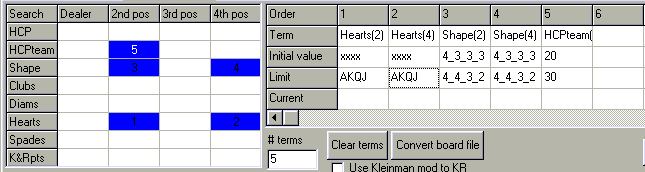
| 11. (Advanced). You can actually cumulate the hands for 2nd/4th seat
in the same table as 1st/3rd seats, because when you specify a new shape
search the bidding analyser is not cleared. This only works correctly if
you did NOT check the box "Specify exact seats". It also only works within
the same fileset, so don't try combining datasets or opening a new file
at this point. There are other ways to amalgamate queries from multiple
data sets, but you will need the full product on CD from REC in order to
do that.
Here's what the Brd Shape/HCP tab needs to look like just before you press "Search" for the second time.
|
| RESULTS
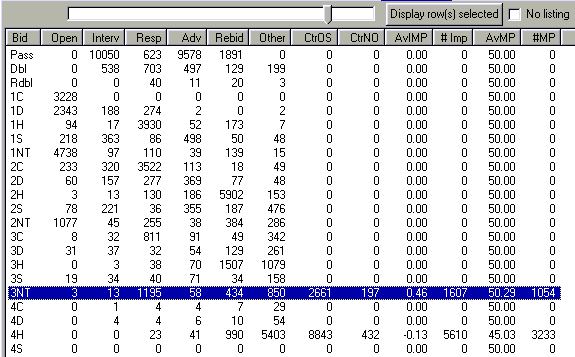
1. Here is what the "Bid analysis" tab looks like on my screen. If your screen is big enough, stretch the window downwards by grabbing the bottom, thus:
Note that the "slider" above the table is set to "CtrOS". We are not particularly interested in contracts of 4H (or 3N) by the OTHER side from opener, they are expected to have awful scores, and they do :) NOTE: I accidentally left the box (not visible) checked that
says "Count passes Interv thru Rebid", which may explain a minor difference
in the first row of the table from what you actually see.
|
| 2. It seems clear that 3NT is a better contract given our constraints. This is not a huge number of hands (you can check the SEMs yourself, see below), but I did run the same query on a much larger data set. The effect in the larger data was not quite as pronounced, but still about .5 IMPs or 3% MP in favour of 3NT. |
| 3. Check "Detailed" and then press the button marked "Write
Report (CSV)". You wil be prompted for the name of an output file. The
result is suitable to be read in Excel or any Spreadsheet program (Quattro,
Lotus, Works, etc). Included in the report are columns showing the Standard
Error of the mean (as a rough guide, the mean + or - one SEM covers 66%
of the distribution, I think, I am sure some statistician will correct
me). I also saved the report myself for those of
you too impatient.
All of these numbers can be viewed interactively by holding the mouse
over the cell in the table, if you don't feel like messing around with
a spreadsheet. However the curious of you will surely want to do just that,
mess around.
|
| 4. If you want to look at (the hands from) one cell, you can right-click it as before. Be very careful not to "clear results" or the whole table gets blanked! |
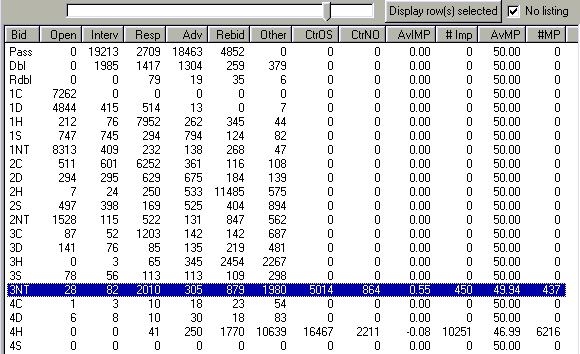
| 5. The results of the combined search 1/3 +2/4 looks like this, in
case any of you were bold enough to try it:
It looks as if the addition of the results for 2nd and 4th seat confirms
what we already measured.
|
| CONCLUSIONS:
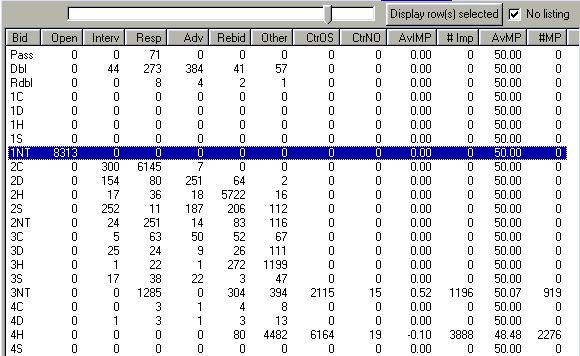
If you play a Notrump opener that promises at most 1 4-card major (and no 5-card major) you should prefer a 3NT contract when responder is balanced (no 5-card suit) even if there is a 4-4 Heart fit (I can't speak to spades just yet!). Of course many hands here were opened with 1C or 1D, so this doesnt apply directly. If you want to look at (only) 1NT openers from this table, you can do the following: a. Right-click the cell for 1NT opening in the bid analysis table, select "all hands" b. wait for the hands to appear in the main display (the progress bar should go GREEN). c. Uncheck and RE-check the box "Enable as auxiliary term" to disable and re-enable the bidding analyser. Now you should see the breakdown of the hands already pulled out, but including only those opened 1NT (of whatever range). Like this:
Interesting! After a 1NT opening, the effect is more pronounced at IMPs and less pronounced at matchpoints. I checked this on the larger dataset, offline, and it appears to be reproduced. I hope this is useful. Please write to me and tell me what you didn't understand. Here's the email again Stephen Pickett
|
| NOTES: |
| 1. You should (always) get the latest client. It last changed on 22
February. You will be locked out unless you have a recent one. No more
Mr. Nice Guy, we had some crashes from folks using a very old client. I'll
try and automate this soon.
that address again: http://www.microtopia.net/bridge/downloads/online.exe 2. Remember to try Spades! |